
For most flights within the US, a mobile boarding pass on your phone is enough. Paper still wins on a short list of trips: certain international airports, flights where an officer must check or stamp a document, and any day your phone could fail you. The smart habit is to travel on the digital pass and keep a printed or saved backup whenever your route leaves the easy domestic path. This guide shows how to tell which situation you are in before you leave home.
TL;DR
- A digital boarding pass (the barcode in an airline app, wallet or email) works at security and the gate at most major airports, but acceptance depends on the airport and the airline, not only on you.
- Paper is required or safer at some airports abroad, on some international routes with visa or document checks, and when your phone is dead, cracked or offline.
- You can usually get a paper pass free at an airline counter or kiosk, but airport printing can carry a fee at some airports, so printing at home is the cheap backup.
- Save the pass inside the airline app or your phone wallet so it opens without a signal, and bring a power bank on long travel days.
- Check every airport on your itinerary, including connections, because one airport that does not accept digital passes can break the whole trip.
Table of Contents
- What the two passes actually are
- Where a mobile boarding pass is enough
- When paper is required or safer
- Mobile vs paper at a glance
- What to do if your phone lets you down
- A simple decision routine before every trip
- Why the booking matters as much as the pass
- Compare flights with the whole trip in mind
- FAQ
- Sources
What the two passes actually are
A boarding pass is the document that lets you through security and onto the aircraft. It carries a barcode or QR code that gate and checkpoint scanners read, plus your name, flight, seat and boarding group.
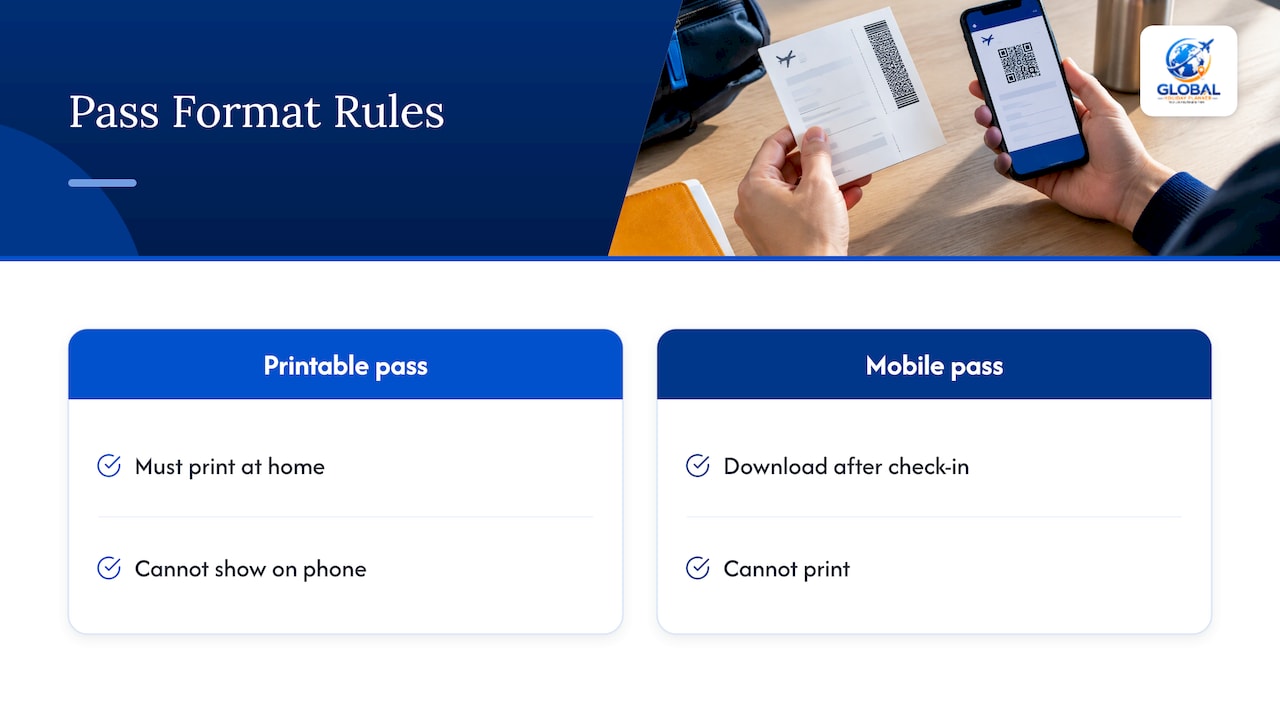
The difference between the two versions is mostly how they reach you and what the airline lets you do with them. One European airline’s help page, for example, separates a printable pass that must be printed at home and cannot be shown on a phone from a mobile pass that you download after check-in and cannot print. Many airlines are more flexible and let you choose either, but the point holds: the format is set by the airline’s system, and not every format is valid everywhere.
One more distinction trips people up. Check-in is the step where you confirm your flight; the boarding pass is what you receive afterward. Online check-in typically opens anywhere from 48 hours to 90 minutes before departure, depending on the flight and destination, and each airline publishes its own window. If you cannot generate a digital pass, you can usually collect one at the airport check-in counter.
Where a mobile boarding pass is enough
Within the United States, you are in the best position for a phone-only trip. Airlines and airports have built their checkpoints and gates around scanning phone screens, and the reader hardware is everywhere. You check in through the app, add the pass to your phone wallet, and hold the screen to the scanner.
On international trips, the same logic applies at many large hubs. One airline’s guide to its accepted passes lists airports including Los Angeles, New York JFK, Vancouver, Sydney, Singapore, Tokyo Haneda and Narita, and Shanghai Pudong as accepting digital passes. Another carrier says a mobile pass lets passengers pass security and board at many airports.
Notice the wording: “many,” not “all.” The rule of thumb is that digital works on the big, well-trodden routes and gets less certain as you move toward smaller airports, border-sensitive routes and trips with several carriers.
Why digital is worth using when it works
- No printer needed. You do not need a hotel business center or a kiosk stop.
- Updates reach you. Gate changes and delays appear in the app, where a paper pass stays frozen at what was printed.
- Nothing to lose. There is no sheet to crumple in a bag or leave on a seat.
- Faster for carry-on travelers. If you are flying light, a phone-only routine keeps your hands free. Our guide to carry-on only travel pairs well with it.
When paper is required or safer
The reasons fall into four groups. Knowing which one applies to your trip tells you what to do.
1. The airport does not accept digital passes
Some airports simply do not accept mobile passes at security or at the gate. One European budget airline publishes a list of such airports, including Agadir, Antalya, Marrakech, Hurghada, Luxor, Sharm El Sheikh, Belgrade and Cairo Sphinx, and instructs passengers there to check in online and print a paper pass. It adds that many of these airports run a document check at bag drop before security.
Because these lists belong to individual airlines and change, you cannot treat one as universal. The practical step is to open your airline’s page on boarding passes for each airport you touch, departure and return, and look for your airport by name.
2. Visa or document checks need a stamp or a printed copy
Where an officer must see, retain or stamp the pass, a phone does not work. One Japanese carrier’s airport-by-airport guide says a paper pass is required for entry into India and mobile passes are not accepted there. Another airline notes that a printed pass may be needed on certain international flights involving visa checks, or at some transfer points.
This is why visa rules and boarding passes belong in the same planning session. Our guide to visa requirements for a smooth trip covers the entry paperwork; the boarding pass is the last document in that chain.
3. The pass is tied to a specific app
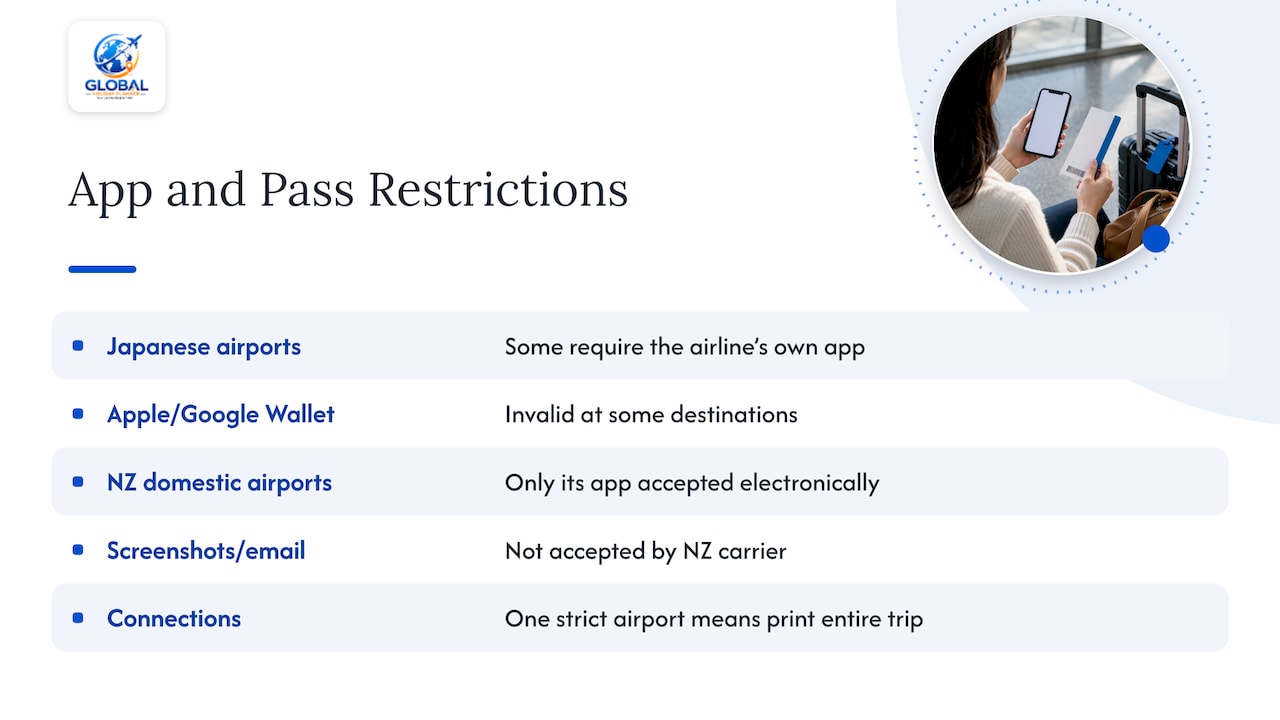
Some airlines accept only their own app at certain airports. The same Japanese guide says that at some destinations only the airline’s own app pass is valid, and Apple Wallet or Google Wallet versions cannot be used. It also says a screenshot of a printed pass has an unusable barcode, so print at home if you need paper.
A New Zealand carrier is similarly specific: at domestic airports there, only its own app pass is accepted electronically, and screenshots or emailed versions are not. It also says every airport on a journey must accept electronic or home-printed passes for a digital pass to work. That last point matters for connections: one strict airport in the middle of an itinerary forces a printout for the entire trip.
4. The airline has its own exceptions
A 2023 report said Emirates required most passengers departing Dubai to use a mobile pass from May 15, 2023, and still listed exceptions that need a physical pass: infants, unaccompanied minors, passengers needing special assistance, onward flights on other airlines and all flights to the US. Policies like this change, so read it as an example of how rules differ by airline and route, and check the airline’s current page before you fly.
Mobile vs paper at a glance
| Situation | Mobile pass | Paper pass |
|---|---|---|
| US domestic flight, major airports | Usually fine | Optional backup |
| International flight from a large hub | Often fine, confirm the airport | Smart backup |
| Airports on an airline’s “no mobile” list | Not accepted | Required |
| Entry or exit that needs a document check or stamp | Often not accepted | Required |
| Phone is dead, cracked or has no signal | Fails unless saved offline | Works |
| Several airlines or a tight connection | Depends on every airport | Safer |
| Travel with a group on one booking | Depends on the app | Easier to hand out |
What to do if your phone lets you down
The risk of a phone-only trip is not the technology on a good day. It is the single point of failure: one battery, one screen, one signal.
Here is how the airlines themselves suggest handling it:
- Save the pass offline. One carrier recommends taking a screenshot after creating the pass or saving it to Apple Wallet or Google Pay for offline access. Another explains that on iPhone, checking in through its app and choosing “Save to device” stores the pass in Wallet for offline scanning. Remember that some airlines and airports reject screenshots, so the wallet or app copy is the better choice.
- Keep power. Charge to full before leaving for the airport and carry a small power bank on long days with connections.
- Replace a damaged screen display. If your screen is cracked or deeply scratched, one airline advises printing a physical copy before you arrive.
- Ask at the counter. If the phone dies, the same airline says you can collect a free physical pass at a counter or self-service kiosk with your ID or passport. Counters take time, so build that buffer in rather than discovering the problem at the gate.
Airport printing is not always free everywhere. A consumer-rights site notes that airport printing often carries an extra charge, which is one more reason to print at home when you know you want a backup.
A simple decision routine before every trip
Take five minutes after booking, and again after you check in:
- List every airport. Include departure, connections and return.
- Check each airline’s boarding pass page for those airports. If any is on a “paper required” or “app only” list, plan accordingly.
- Check entry rules. If your destination or connection involves a visa check, assume you may need paper until the airline says otherwise.
- Check in when the window opens. The time varies by airline and flight, so look at the confirmation email.
- Choose your format. Digital in the app or wallet, plus one printed copy when any step above raised a flag.
- Pack the backup. Put the printout with your passport so the two travel together.
Different trips, different defaults
- Weekend couples’ trip within the US: phone only, with the pass saved in your wallet.
- Family with kids and grandparents on one booking: print everything. Passing a single phone between several adults at a gate is awkward, and passengers such as infants may be treated differently by some airlines.
- Corporate traveler on a same-day turnaround: digital in the app, with the pass saved offline, and a power bank in the laptop bag. For routines that keep business trips smooth, see our business travel booking tips.
- Golf group heading abroad: print for every traveler, since clubs, extra bags and counter stops mean you are likely to visit the airline desk anyway. Our guide to flying with golf clubs covers the rest.
- Budget traveler on a multi-airline itinerary: print. Separate tickets mean separate systems, and a printed pass is the same format at every desk.
Why the booking matters as much as the pass
The boarding pass comes after the booking. Choices you make earlier, such as which airline you fly, whether you connect, and whether you split a journey across two carriers, decide how many airports and systems your pass has to work in. A simple nonstop on a single airline is the easiest case for a phone-only trip. A trip stitched together from three separate tickets is the hardest, and it is also where paper earns its place.
That is why it helps to compare complete itineraries rather than only the lowest fare. A cheap fare that adds a connection through a stricter airport can cost you time at the desk. Our piece on airline add-on fees shows how small extras change your total, and the same thinking applies to convenience.
Perspective
We build trips around the whole journey, not just the ticket. Our approach is side-by-side comparisons across flights, hotels, car rentals and the rest, with recommendations matched to the kind of trip you are taking, so you can see the real total cost and the best fit for your itinerary in one place.
The boarding pass question is a good example of that way of thinking. The format of your pass is decided by your route: how many airports, how many airlines and what paperwork the destination asks for. A direct domestic hop and a multi-stop family holiday are different problems and deserve different answers.
Our advice is to compare the itinerary first, choose the simplest route that fits your trip, and then carry digital by default with a printed backup whenever the route has any complexity. It costs a sheet of paper and removes the single point of failure.
Global
Compare flights with the whole trip in mind
When you are ready to choose a flight, our flight comparison page lets you look at options side by side, and you can line up airport transfers and hotels in the same planning session so arrival and departure fit together.

If the airport is the part of the trip that worries you, our guide to airport fast track explains what it covers and when it pays off.
FAQ
Is it enough to have a boarding pass on a phone?
On most US domestic flights, yes. Internationally it depends on the airline and every airport on your route, because some airports and document checks still require paper. Look up each airport on your airline’s boarding pass page, and save the pass in the app or wallet so it opens offline.
Can you get a paper boarding pass at the airport?
Yes, in most cases. One airline says passengers can collect a free physical pass at check-in counters or self-service kiosks with an ID or passport. Policies differ by airline and airport, and counters can have lines, so allow extra time.
Do I need a boarding pass printed?
Not always. You need paper when your airline or airport says so, for example at airports that do not accept mobile passes or on routes with visa or document checks. If any part of your trip is on such a list, or you want insurance against a dead phone, print one copy at home.
What is the difference between web check-in and a boarding pass?
Web check-in is the step where you confirm your flight with the airline, often in an app or on its site. The boarding pass is the document you receive afterward, either to print or to keep on your phone. Where a digital pass is not available for your route, you can collect it at the airport desk.
Is a screenshot as good as the app pass?
Not always. Some airlines accept screenshots and some do not, and one carrier says screenshots of printed passes have unusable barcodes. The wallet or app version is the safer digital copy.
Sources
- What types of boarding passes are there? | Transavia
- Check-in FAQ | Oman Air
- Checking in | Singapore Airlines
- Accepted Boarding Passes Guide | Air New Zealand
- Turkish Airlines mobile boarding pass
- Mobile Boarding Passes | easyJet
- Types of boarding passes available at each airport | JAL
- No more printed boarding passes for Emirates’ Dubai flights | Khaleej Times
- Mobile and The Emirates App FAQ | Emirates
- What is a boarding pass? | Flightright