

Travel itinerary planning means turning a trip idea into a day-by-day plan of destinations, activities, transport, and bookings you can actually follow. The most reliable method is map-first: cluster nearby sights into daily units, anchor each day with one or two fixed commitments, and leave the rest loose. Add realistic transit buffers and you get a plan that survives contact with reality, which is more than most spreadsheets can say. Global Holiday Planner supports this exact workflow by letting you compare flights, hotels, and transport in one place while you build it.
TL;DR:
- Lock in your flights and first and last night’s accommodation early to secure better prices and avoid last-minute availability issues.
- Cluster attractions by neighborhood and add 20 to 30 percent extra travel time to avoid delays in unfamiliar cities.
- Limit major activities to two or three per day with at least one rest day for trips longer than a week to maintain a realistic pace.
- Use map-based planners for visual clustering or inbox-import tools for managing multiple bookings, balancing speed with control.
- Book international flights three to six months in advance and local activities closer to departure to maximize flexibility and save costs.
Table of Contents
- How Do I Plan My Trip Itinerary Step by Step?
- Which Tools Keep an Itinerary Organized Without Overcomplicating It?
- What Template Should I Use for a Day-by-Day Plan?
- How Do You Cluster Attractions Into Efficient Day Units?
- How Much Should a Trip Cost and When Should You Book?
- What Are the Most Common Itinerary Mistakes?
- How Does Global Holiday Planner Support This Workflow?
- DIY Spreadsheet or Planning Platform: Which One Wins?
- Ready to Turn Your Plan Into Booked Travel?
- Sources
- FAQ
How Do I Plan My Trip Itinerary Step by Step?
Good itinerary planning starts before you look at a single attraction. Nail down the trip’s purpose, your fixed dates, passport and visa status, budget ceiling, and the pace you actually want. A honeymoon and a father-son fishing trip get planned in completely different ways, even if both are seven days long.
Here’s the sequence that works for almost any trip type:
- Lock your constraints first. Dates, entry requirements, and budget are non-negotiable; everything else bends around them. Check passport validity and visa rules through Timatic, IATA’s official system for entry, visa, and health requirements, since airlines and agents rely on it and it updates in real time.
- Decide how many destinations you can realistically cover. Transport reality, not enthusiasm, should set this number. If getting between two cities eats a full day, that’s a night you don’t have for a third stop.
- Assign nights per place based on routing, not wish lists. Plan the transport backbone before you assign hotel nights; it usually shrinks your destination list more than people expect.
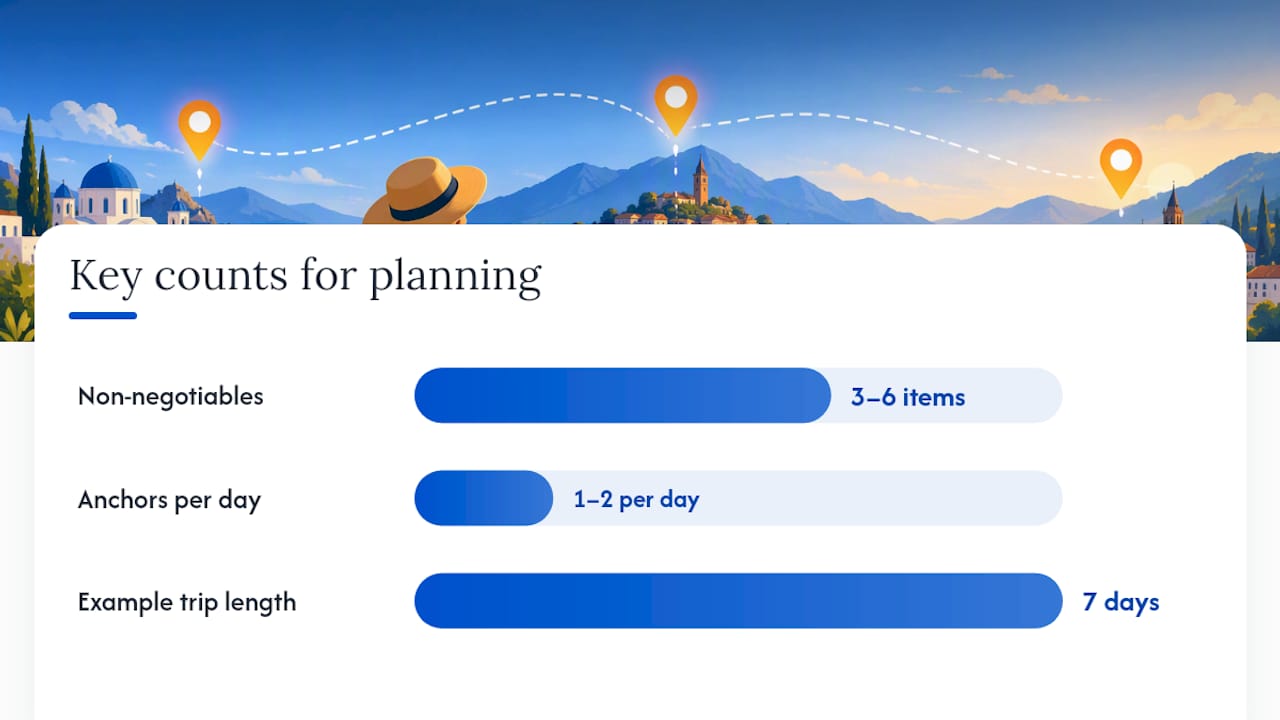
- Pick 3 to 6 non-negotiables for the whole trip. These are the things you’d be upset to miss. Everything else is negotiable filler.
- Set 1 to 2 anchors per day. An anchor is a fixed, timed commitment, a museum entry slot, a dinner reservation, a tour departure. A balanced itinerary keeps this number low and treats the rest of the day as flexible space.
- Cluster remaining sights geographically into day units, then assign travel time and buffers between them.
- Decide what to book now versus later. Flights, first and last night accommodation, and any sold-out or timed-entry experiences go first. Everything replaceable waits.
- Build your final checklist: booking confirmations saved offline, transport windows written down, insurance purchased, and a contact list for lodging, guides, and emergency numbers.
Pro Tip: Write your arrival and departure times into the itinerary before anything else. Half the scheduling mistakes travelers make come from forgetting that a 9 p.m. landing means no dinner reservation that night, not a full evening of sightseeing.
The point of this sequence isn’t rigidity. It’s that a plan built on real constraints, rather than a Pinterest board of “things to see,” is a plan you’ll actually follow once you’re jet lagged and standing on an unfamiliar street corner.
Which Tools Keep an Itinerary Organized Without Overcomplicating It?
The right tool depends on how you think, not on which app has the most features. Three broad categories cover almost everyone.
Map-first planners let you drop pins, group them into day clusters, and see travel time between stops visually. These suit visual planners and anyone doing multi-neighborhood city trips where backtracking is the enemy.
Inbox-import builders scan your email for flight, hotel, and rental confirmations and auto-build a timeline from them. They’re fastest for business travelers or anyone juggling many separate bookings who just wants one master view without manual data entry.
Templates and spreadsheets (Google Sheets, printable PDFs, shared docs) give you full manual control. They’re slower to build but far more flexible, and they’re still the standard for group trips where several people need to see or edit the same plan, since collaborative templates and printable formats remain useful when offline reliability matters.
When comparing options, look for:
- Map visualization that shows clusters and distances, not just a list
- Offline access, since hotel Wi-Fi and foreign data plans fail you at the worst moment
- Offline access, since hotel Wi-Fi and foreign data plans fail you at the worst moment
- Calendar sync so anchors show up alongside your regular schedule
- Collaboration features if more than one person is planning
- Auto-import of bookings, which modern itinerary apps increasingly support to cut down on manual entry
A workable hybrid: use inbox import to auto-populate confirmed bookings, use a map workspace to shape your day clusters, then keep one single master itinerary as the source of truth. Chasing three different half-finished plans across three apps is how details get lost.
What Template Should I Use for a Day-by-Day Plan?
A simple day-grid template beats a fancy app for most travelers. Structure each day with a time block, the anchor activity, a transit note, and a meal suggestion. That’s it. You can build this in a notes app in ten minutes.
- Family trips: add a “backup/rain plan” column, since kids and weather both change plans fast
- Business trips: add a meeting/contact column and keep anchors tighter, since free time is limited anyway
- Road trips: replace “transit note” with drive time and gas/charging stops between clusters
- Multi-city vacations: add a row for luggage storage and check-in/check-out times, since these eat more time than people budget for
Use printable PDFs when you’ll have spotty connectivity, a shared Google Sheet when multiple travelers need to edit together, and a mobile map view when you want live navigation layered on top of the plan. For a quick start, copy a bare grid into Google Sheets: columns for date, time, activity, location, and notes, one row per anchor, and let the white space between anchors stay intentionally empty.
How Do You Cluster Attractions Into Efficient Day Units?
Group by geography or transit line, not by how excited you are about each stop. Experienced planners consistently recommend clustering attractions by neighborhood to minimize transit time and avoid the classic mistake of crossing the same city twice in one day.
- Map every item on your wish list, then look for natural geographic groupings rather than a chronological “must-see order.”
- Add 20 to 30% extra time to any transit estimate in an unfamiliar city. Google Maps’ walking time assumes you know exactly where you’re going; you won’t.
- Leave at least 30 minutes between fixed, timed commitments. This buffer absorbs the inevitable wrong turn, bathroom stop, or ticket line.
- Test the cluster by counting total walking distance and stops, not just the number of attractions. Six sights within a ten-minute walk of each other is a light morning. Six sights spread across a city is a day of failure waiting to happen.
Pro Tip: Turn six nearby sites into two half-day clusters instead of one exhausting full day. You’ll see the same number of things with far less fatigue and enough slack to actually enjoy lunch.
Sometimes clustering isn’t the right call at all. A full-day guided tour, a multi-hour theme park, or a single spectacular hike deserves the entire day as its own anchor. Don’t force a big single-destination day into a multi-stop cluster just because the template expects one.
How Much Should a Trip Cost and When Should You Book?
Total trip cost breaks into six buckets: flights, accommodation, local transport, activities, daily spending (food, incidentals), and a buffer for the unexpected. Skip that last bucket and you’ll feel it the moment a taxi costs triple what you budgeted.
- Flights: often the single biggest line item and the most time-sensitive to book
- Accommodation: lock in first and last night early; everything in between can flex more
- Local transport: trains, rental cars, transfers, price these once you know your cluster map
- Activities: separate “must book ahead” from “buy same day”
- Daily spending: food, tips, small purchases, easy to underestimate by 30% or more
- Buffer: a straightforward 20% added to your total covers surprises without derailing the budget
Statistic Callout: For international trips, booking guidance from experienced trip planners recommends starting 3 to 6 months ahead for peak-season travel, and 4 to 8 weeks ahead for typical flight pricing outside peak season.
Book flights, your first and last nights, and any sold-out or timed-entry attraction as soon as your dates are firm. Delay local restaurant reservations and day-of tickets until you’re closer to departure, since locking those in early only removes flexibility you might want later. Set price alerts on flight searches so you’re not manually checking fares every day, and buy travel insurance early enough that it covers trip cancellation, not just medical events during the trip itself.
What Are the Most Common Itinerary Mistakes?
Overstuffing is the number one reason itineraries collapse. Insurer guidance and experienced planners agree that limiting major activities to 2 or 3 per day with at least one rest day on any trip longer than a week keeps a plan realistic instead of aspirational.
- Never stack timed commitments back-to-back with no buffer between them
- Keep evenings open by default rather than scheduling dinner reservations every single night
- Build in one full rest day on trips longer than seven days, even if it feels like “wasting” a day
- Write down arrival and departure times before booking anything else on those dates
- Keep one editable master plan instead of five versions across apps and notebooks
- Use a shared doc for group trips so everyone sees the same version, not their own outdated copy
Pro Tip: If your daily plan reads like a checklist with no gaps, you’ve built a schedule to survive, not a trip to enjoy. Cut one item from every day that has three or more anchors.
How Does Global Holiday Planner Support This Workflow?
Global Holiday Planner fits directly into the map-first, anchor-and-buffer method described above. Its comparison tools cover flights, hotels, car rentals, rail tickets, and travel insurance side by side, which makes the cost-bucket exercise from the budgeting section far faster than pricing each component separately.
- Compare flights, hotels, car rentals, and insurance together to understand total trip cost scenarios before you commit
- Use scenario-based recommendations to match a plan to different trip types, such as family vacations, golf trips, or business itineraries
- Reserve first and last night accommodation early through the same hotel booking flow you use for the rest of your trip
- Keep booking links and confirmations organized rather than scattered across multiple accounts
The platform doesn’t replace the clustering and buffering work you do on a map. It removes the friction of comparing dozens of booking options once your day units and priorities are already set.
DIY Spreadsheet or Planning Platform: Which One Wins?
Spreadsheets win when you want total control over a niche workflow, a research trip with unusual logistics, a slow-travel month where flexibility matters more than optimization, or a trip so specific that no template quite fits. Nothing beats a blank grid for that.
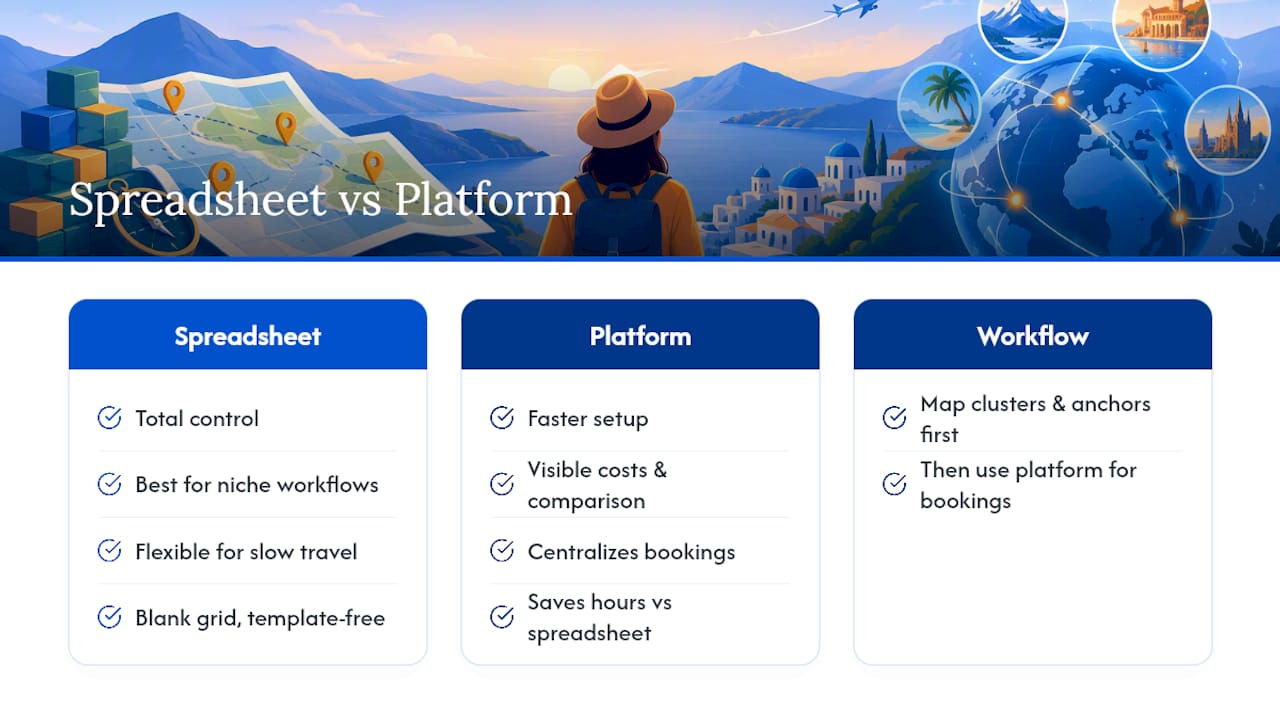
A platform wins on speed and cost visibility. When you’re juggling flights, hotels, car rentals, and insurance across multiple travelers, comparing all of it in one place saves hours a spreadsheet can’t replicate on its own.
My honest recommendation lines up with the workflow in this article: build your clusters and anchors on a map first, then let a platform handle the booking comparison and cost scenarios once the structure exists. Doing it in the other order is how people end up booking flights before they’ve figured out if the itinerary even works.
— Global
Ready to Turn Your Plan Into Booked Travel?
You’ve got the workflow: cluster your days, anchor them with one or two fixed commitments, pad your transit estimates, and price the whole trip in buckets. The part that eats the most time from here is comparing flights, hotels, car rentals, and insurance across a dozen browser tabs. Global Holiday Planner exists to cut that step down, letting you see real prices for each trip component side by side instead of pricing your itinerary piecemeal across five different sites.
Once your day clusters and anchors are set, lock in the two bookings that matter most first: your flights and your first and last night’s accommodation. Everything else in your itinerary can stay flexible, but those two shouldn’t. Check current fares and rates now, while your travel dates are still fresh in your plan, and build the rest of your schedule around what you confirm today.
Sources
- How to create the perfect travel itinerary — Allianz Travel Insurance
- Timatic — IATA
- How to build the perfect travel itinerary — Somewhere Overseas
- Creating a balanced travel itinerary — TravelInsured
- Best itinerary planner apps for travel in 2026 — Beyond Baggage
FAQ
How Do I Plan My Trip Itinerary?
Start with fixed constraints (dates, visa status, budget), pick 3 to 6 non-negotiable experiences, then cluster remaining sights geographically into day units with 1 to 2 anchors per day. Book flights and first/last night accommodation early, and leave the rest flexible.
What Is the Best Way to Organize a Travel Itinerary?
The most reliable method is map-first clustering: group nearby attractions into day units to minimize transit time, anchor each day with one or two timed commitments, and build in transit buffers of 20 to 30% in unfamiliar cities. A single master plan, whether a spreadsheet or a planning app, keeps everyone working from the same version.
What Is Travel Itinerary Planning?
Travel itinerary planning is the process of converting a trip idea into a day-by-day schedule of destinations, activities, transport, and bookings. It covers everything from choosing how many cities to visit to deciding what to book months ahead versus same-day.
What Is the Best App to Organize a Travel Itinerary?
The right choice depends on your style: map-first apps suit visual planners clustering sights by neighborhood, while inbox-import tools suit travelers juggling many separate bookings who want one auto-built timeline. Global Holiday Planner works well when you want to compare flights, hotels, and other trip costs alongside your itinerary in one place.
How Far in Advance Should I Book Flights and Hotels?
For most international trips, book flights 4 to 8 weeks ahead, extending to 3 to 6 months for peak-season travel. Reserve first and last night accommodation as soon as dates are firm, and leave local restaurants and day-of tickets for closer to departure.